Thursday, April 24, 2014

68k project: step 7 - CP/M 68, booting from Srecords

Ok, lets start from code. Code for ChVII
  The firmware is mostly [or exactly?] the same, but there are two new directories - BIOS ,which contains BIOS (sort of ugly bios), and Disk, which contains pretty empty disk image and diskdefs for cpmtools. (local)
The disk image itself contains A: - P: drives, cpmtools with this diskdefs are able to write to A: . Write there a whole CP/M distribution. The disk image comes from Searle Grant's Z80 SBC, (or even my mentioned SD interface for it) as all the DPB stuff.
  For the bios reassembly use assemble script, you'll get bios.s. Next, load it and CPM15000.SR via cut-and-paste to SBC console.
  Personally I do it with kermit. It's much better for our use then saying minicom.
  Here is my kermit initialization (I hope I forgot nothing:)
set line /dev/ttyS0
set car off
set speed 38400
set flow rts
set transmit timeout 10

(and set input echo on, but I forgot what it is for and if it is really needed)    So from SBC prompt say
* boot
, it will initialise the card and load something ($2000 bytes?) to somewhere ($1000?). But currently we do not care.
  Next, load bios.s and CPM15000.SR by

 C-Kermit> transmit CPM15000.SR

and

 C-Kermit> transmit bios.s

Next, run it via go15000 and get A:.
  The next thing is to create CPMLDR and CPM.SYS. Sure, we will create them on the board. But I refuse to learn CP/M ed!
So, the next thing I going to do is to get some text editor. And that will be separate chapter or two.


Some things to mention:
  • First, get .68K files from .REL . That's done by series of RELOCX.SUB scripts
  • if AS68 says can't open 0:AS68SYMB.DAT, ensure you have AS68INIT from DISK3 and run AS68 -I AS68INIT for every TPA change
  • http://forums.debian.net/viewtopic.php?f=16&t=112244 A very good article how to recalculate DPBs into cpmtools diskdefs.
    It does not help me much because it is long and clever; I always guess some things (and probably wrong)

A working CP/M 68K emulator found

it is fresh and newly-written, but it works
Also, it contains a working version of emacs! That solves my need for a text editor for CP/M 68k (but not a reason to finish my attempts to port dealin and ted editors)

Monday, April 21, 2014

I have a bootable CP/M 68!

Yes,I did it!
Looks like AS68 has some problems with conditional assembling, so I had to pass my assembler source via linux's cpp. As well it does not like symbols longer then 8 chars (and it's clear why), so using cpp was a good idea (and then transfer it on board).
Anyway, I've got an $18000 TPA. Good!

Thursday, April 17, 2014

I've burned one more Atmega8A

And found that I have no any Atmega8As till tomorrow. Hopefully this online shop promise to deliver me some chips on next day after an order [in Moscow]; that's good!
I have some Atmega8L's (max 8 Mhz), and tried to make them work at least at 9600.
Ha! It works on 38400! My 68kavr flow control algorithm considered to be good.

Wednesday, April 9, 2014

68k project: step 6 - lets' start thinking about CP/M

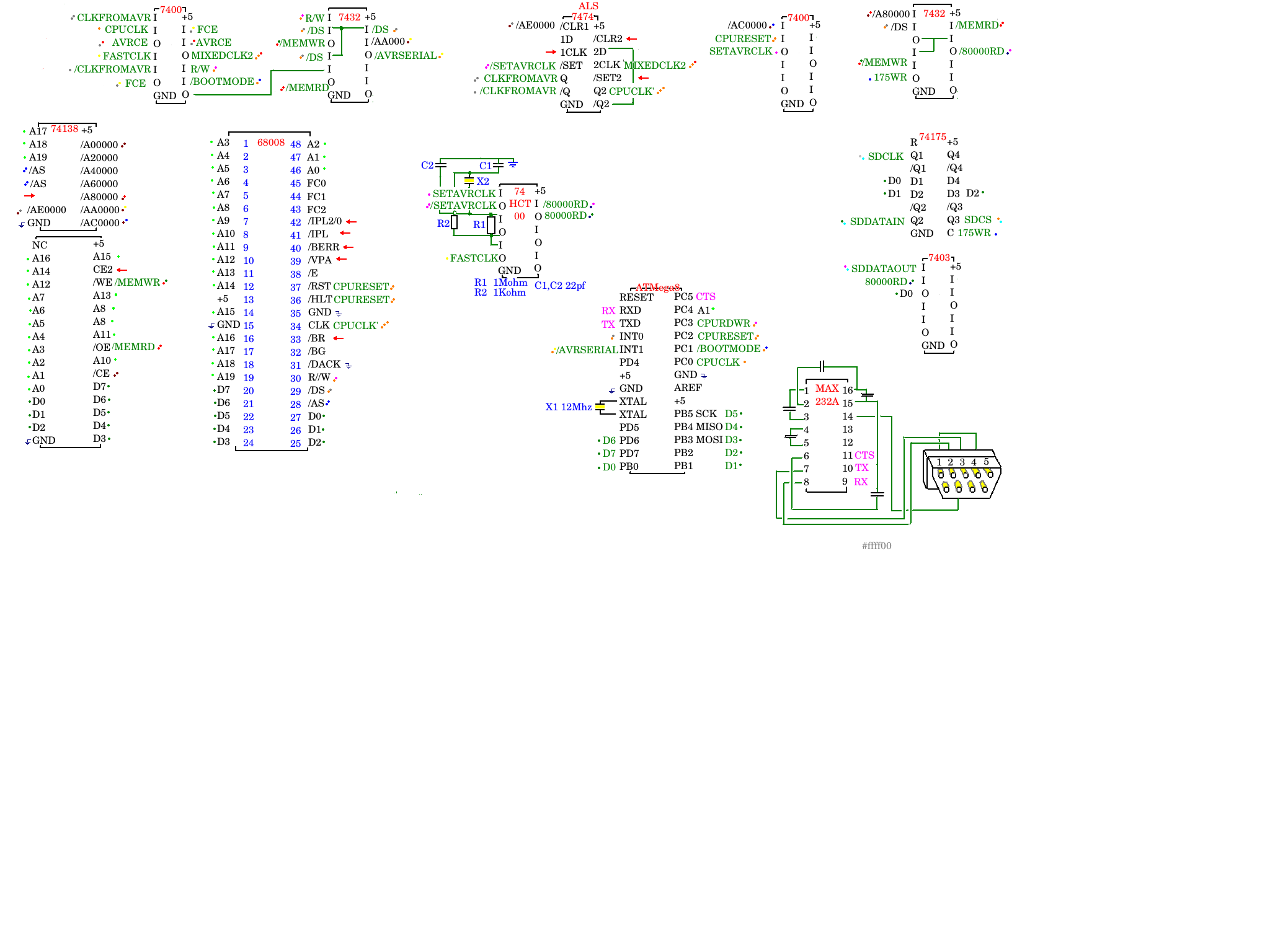
First, some news of the project: The updated scheme HERE . Generally nothing new, only MAX232A is drawn
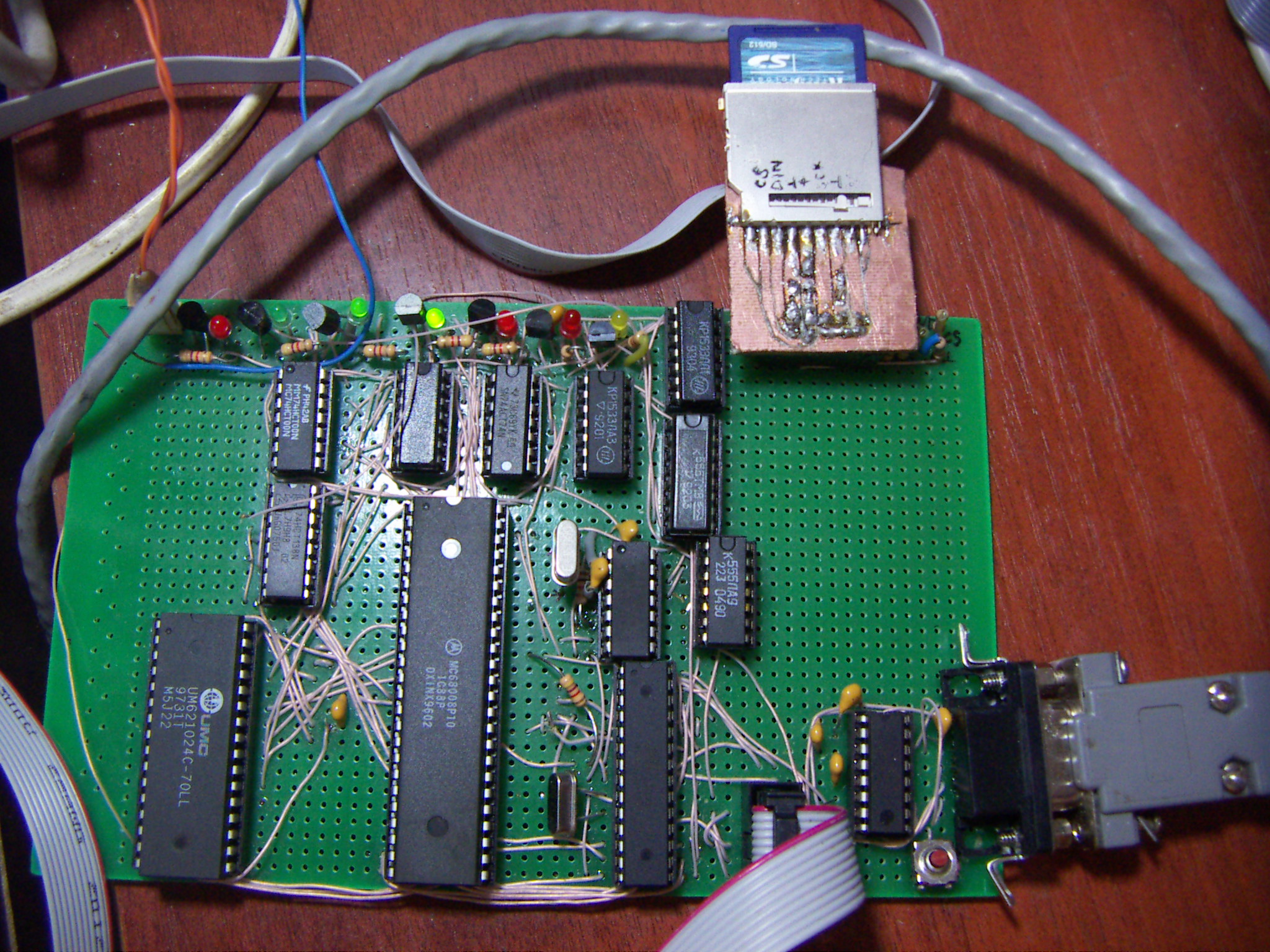
Here is the picture of my board taken 20140325.
First, I have some minor (but nice!) changes in my firmware. First is
GOaddressmonitor command , which goes to the specified address.
And the second... (have I ever told you I'm genius? REALLY? Oh, sorry) - I catch the BREAK from a serial line and inititate CPU Reset! (actually, even MCU reset).
So, in C-Kermit> (if you use C-Kermit as do I) 's terminal mode, I can press [CTRL]+[\] [B] , and get a reset!
More, I own an HP 9000 A500 server and it has as "Service Processor". And I'd like to have a full Service Processor console in future like the one on that server. Saying, it can turn on and off ATX power (if I have a spare pin and free memory on Atmega8)....
Sometimes in future
So, let's talk about CP/M iteself
This is my first attempt to port CP/M to any computer by the method explained in, our case, "System Guide". The prerequestings are:
  • I should have System Guide (I do)
  • I should have CP/M 68 in S-records (I do from http://www.cpm.z80.de/binary.html : I use this)
  • The system must accept S-Records (my does)
  • I must have an assembler which generates S-Records (I use A68k from TI 68K calculator project:
    
    68000 Assembler - version 2.71.F3s (Sep 21, 2004)
    Copyright 1985 by Brian R. Anderson
    AmigaDOS conversion copyright 1991 by Charlie Gibbs.
    Adapted for use with Fargo by David Ellsworth.
    Bugfixes and additions by Julien Muchembled, Paul Froissart and Kevin Kofler
    
    
    Warning: do not use asm68k
    
    asmx multi-assembler version 2.0b5
    Copyright 1998-2007 Bruce Tomlin
    
    
    buggy as shit. May be vasm is good - but I'm not ready to write linker scripts just to get SRecord from the source with static lables and given ORG)
So, on the CP/M distribution there is a file CPM15000.SR - that's an CP/M in S-Records (which is loaded from address $15000).
On the first disk of distribution set there is a very useful README.TXT which says that to create a BIOS I should figure out _init (== ORG of BIOS == $1B000) and _ccp ($150BC) symbols in CPM15000.MAP (and that differs from what is written in "System Guide"; there said you should patch Srecords file [for 1.0 and 1.1 CP/M 68k vers.]).
So lets go to "System Guide" directly to the Appendix B on page 59 and start type "Sample Bios" into text editor.
As you can see, BIOS install TRAP #3 and CP/M works with BIOS via this TRAP. I've tried to start with
  • constat
  • conin
  • conout
, but it was not enough; setexc also a must for CP/M to show you it's A:>. The first thing it does, it installs an TRAP handlers for almost all the TRAPS! I will not retype it here, that will be attached later, when it will be at least read/write sectors. To start CP/M first load CP/M itself, then BIOS, then type go15000
After I wrote basic sector read/write access I was able to say DIR,TYPE and even REN. But could not run any program, that's because I've forgot getseg call at all. And then I was able to run DDT68000, but during read it compained "Cannot write sector" (and it was not writing sector at all!)
That was because I forgot flush call.
Funny - this code contains *No* CP/M specific code yet, and is just update of firmware ;-) Code for ChVI

Tuesday, April 8, 2014

Looking for text editor for CP/M 68K

So, I have plain 68K system where I can CP/M by loading it via SRecords.
I want to build CPMLDR & CPM.SYS, so I want to edit them on board to assemble and link. Edit means editor, and I refuse to understand how cp/m's ED work.
So I want to compile some editor, what's the simpliest? Edlin, for sure.
So we have:
  • FreeDOS's edlin
  • Terry McConnell's deadlin
Both are good edlins. Deadlin's code is simpler, but it uses fgetpos, which CP/M 68K's compiler lacks. FreeDOS's edlin is more complicated.
So currenlty I'm trying to compile them, or find some other edlin clone. I know that MicroEmacs/CP/M-68K exists, that's an apportunity, too.

Thursday, March 20, 2014

68k project: step 5 - SD interface


  The idea of SD interface is just an adoptation of my SD interface for Searle's Grant SBC. So go there for SD card pinout,resistor values, 3.3V power, etc. The only change is 2*7474 to one 74175. Or you can use 2*7474. Or any latch of this sort.
  Some notes: a rewiring /AC0000,CPURESET->SETAVRCLK, FCE,AVRCE->MIXEDCLK2 on the scheme is not significant at all and is here just to correspond my actual wiring.
    As for SD interface, it consists of a 74175 trigger for data output and 7403 as data input. To write to 74175 we mix /A80000 line with /MEMWR and /DS (on an extra 7432) and latch D0-D2 to the trigger, so that are SD card's Clock (SDCLK), DataIn (SDDATAIN) and Chip Select (SCCS) [why SCCS? Rename it to SDSC later] SPI lines. They should be mixed via resistors to get 3.3V-alike signals (again, see this). Do not forget that SD card itself should be feed with +2.8 - +3.3V so you can use 7833 or just a LED to drop the voltage.
   For data in, we mix /A80000 line with /MEMRD and /DS to get /80000RD and invert it to get 80000RD. Passed throw 7403 (with SDDATAOUT) we direct this open-collecor output to D0. So this output is low only when 80000RD is active (high) and SDDATAOUT is high too, so this is inverted input. So, from 68k side we can

    move.b #7,$80000 ; CS - up, Dataout - up, CLK - up
    move.b #2,$80000 ; CS - down, Dataout - up, CLK - down


manage that bits this way (but better keep higher bits high - we may have some extra SPI devices in future), and to read it just read lower bit from $80000 and invert it.

Just to remind:
D0 - CLK
D1 - DATAOUT
D2 - CS
D3 and D4-D7 - reserved for future SPI devices (who knows which? extra Atmega, RTC, etc)

   The Code for ChV can detect (command "BOOT") the card (CMD0), can send it CMD1 for (doing smth usefull), some command to ensure the card's sector size is 512 bytes, but nothing more still. (I use this and this) as reference)
  Also, scince now I use Atmega's PC5 pin for CTS. That's because I've tried to cut-and-paste CP/M-68 S-record files and was unable to do that without hardware flow. So in AVR code there is a #define WITH_CTS to use this code (enabled by default) and 256 bytes ring boofer for handling input bytes from serial.
  As you could note, there is a sort-of-monitor program included in 68k asm Currently it can:
BF Blink SDCLK fast (with fullspeed clock)
BS Blink SDCLK slow (with AVRCLK)
BLINK Blink until key pressed (fullspeed clock)
ON Set SDCLK to 0 (or 1)
OFF Set SDCLK to 0 (or 1)
1 Set SDCLK to 1, SDDATAIN to 0, SCCS to 0)
2 Set SDCLK to 0, SDDATAIN to 1, SCCS to 0)
4 Set SDCLK to 0, SDDATAIN to 0, SCCS to 1)
IN Tell SDDATAOUT status (or inverted SDDATAOUT?)
DUMP[optional address] Dump memory from address (or continue to dump from that address if no address given)
BOOT Try to init the SD card
S[srecord] Parce S-Records. It understands S1,S2,S3 records and ignores all the others

It's easy to extend this command set:
first, write an f_myfunc subrotine which should return to monotor with rts. Then add it's mnemonic to commands: and it's address (f_myfunc) to commands_vector When called, A1 will point to the first byte after you's command mnemonic in input buffer, so if was called as
myfuncbebebe
, A1 will point to "bebebe"
  :Also there is one more thing I want to warn you: I use ISP programming of ATmega via SCLK/MOSI/MISO/RESET pins of ATmega, AND THIS IS UNRELATED TO SPI BUS WE'VE JUST DISCUSSED!
  : Be careful: I've burned 3 Atmega's while ISP programming it until I installed a RESET switch for CPU (RESET+HALT)
So to make an ISP firmware update, hold down RESET+HALT of CPU, then do firmware update (I use avrdude and usbasp)